QGIS vs ArcGIS: Similarities, Differences, Strengths, Weaknesses, and Potential Applications

Ana Luisa Maffini

For many people entering the world of geospatial technologies, one question quickly emerges: QGIS or ArcGIS?
A quick look at online forums, professional groups, or university classrooms reveals that this discussion often sparks strong opinions. But is this really the right question to ask?
Perhaps a more interesting question is:
What does each platform offer, and in which situations does each one make the most sense?
The False Rivalry Between QGIS and ArcGIS
There is a common tendency to treat QGIS and ArcGIS as competitors in a direct contest. However, the reality of professional practice, scientific research, and territorial management is far more nuanced.
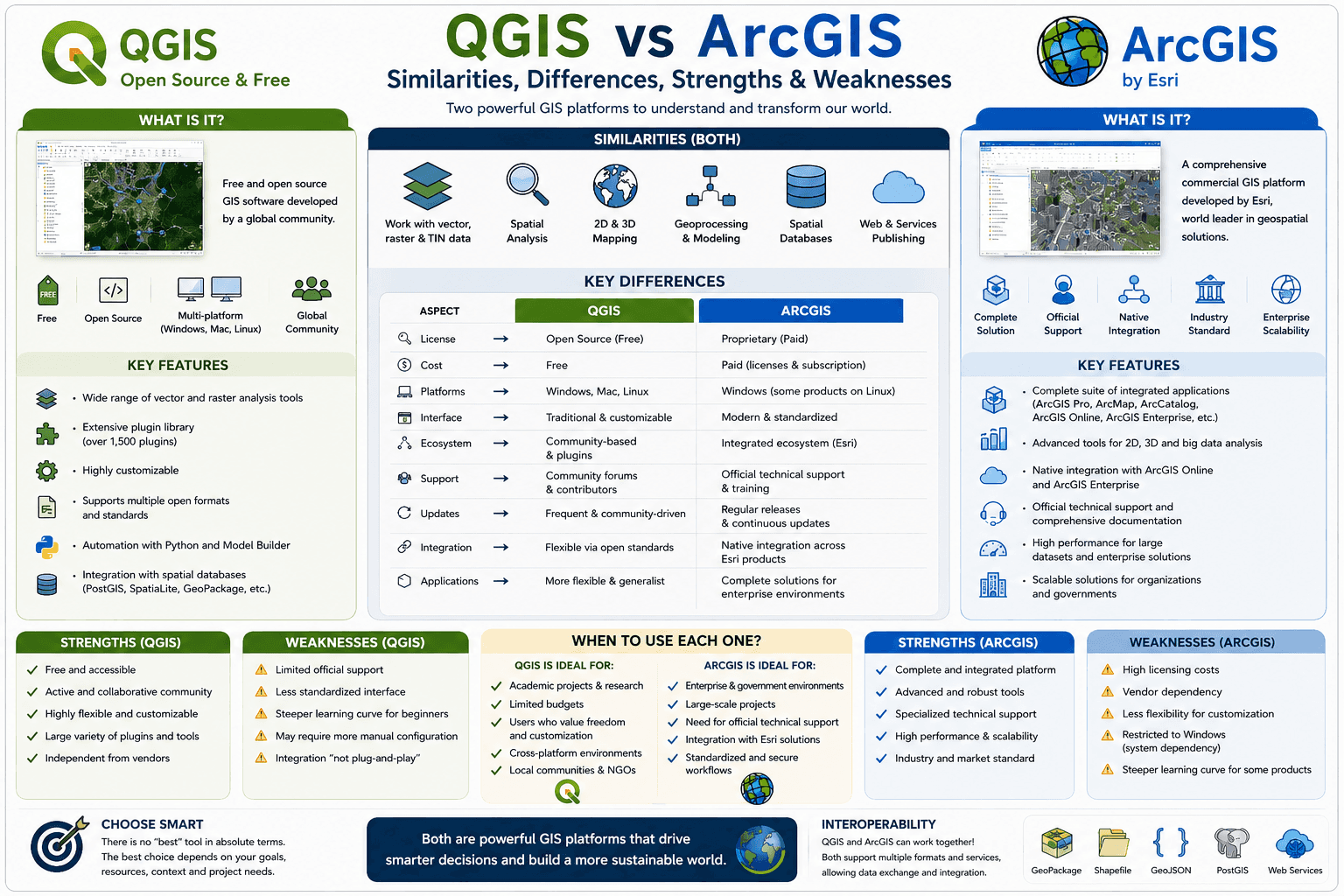
Both are powerful Geographic Information Systems (GIS). Both allow users to visualize, organize, analyze, model, and represent spatial information. Both can produce high-quality maps, perform complex spatial analyses, process satellite imagery, connect to spatial databases, and automate workflows through programming.
In practice, thousands of professionals use both platforms at different stages of their projects.
The real distinction is not necessarily technical capability, but rather philosophy, institutional context, and the ecosystem surrounding each software.
What Do They Have in Common?
When we look at their core functionalities, the similarities are greater than many people realize.
Both QGIS and ArcGIS can:
Create professional thematic maps;
Perform vector and raster analysis;
Process satellite imagery;
Execute geoprocessing operations;
Model territorial phenomena;
Analyze urban and transportation networks;
Integrate with spatial databases;
Automate workflows using Python;
Publish geospatial information on the web.
In other words, for a vast number of projects, both platforms can achieve remarkably similar outcomes.
This raises an interesting question:
If both can solve so many of the same problems, why do organizations and professionals often choose differently?
QGIS: Freedom, Flexibility, and Community
QGIS has established itself as the world's leading open-source GIS platform.
Its greatest strength is not simply that it is free of charge. Its true advantage lies in the freedom it offers users.
The software can be used without licensing fees, runs on multiple operating systems, can be customized through plugins, and integrates seamlessly with numerous open-source tools.
These characteristics have made QGIS particularly popular among:
Universities;
Research institutions;
Public agencies;
Non-profit organizations;
Small and medium-sized consulting firms.
The plugin ecosystem has dramatically expanded its capabilities.
Tools such as QuickOSM, the Semi-Automatic Classification Plugin, and Space Syntax Toolkit allow users to tailor the platform to highly specific needs.
Key Strengths of QGIS
✔ Free and open source
✔ Large international community
✔ Highly flexible and customizable
✔ Extensive plugin ecosystem
✔ Excellent Python integration
✔ Strong support for open standards
✔ Cross-platform compatibility (Windows, Linux, macOS)
Key Limitations of QGIS
⚠ Variable quality among plugins
⚠ Less standardization across versions
⚠ Decentralized technical support
⚠ Some workflows require manual configuration
⚠ Learning curve can be challenging for beginners
QGIS offers extraordinary flexibility, but that flexibility often requires greater user autonomy.
ArcGIS: Integration, Standardization, and Enterprise Solutions
ArcGIS follows a different philosophy.
Rather than being a single software package, it is a comprehensive ecosystem developed by Esri, one of the world's leading geospatial technology companies.
The ArcGIS ecosystem includes:
ArcGIS Pro;
ArcGIS Online;
ArcGIS Enterprise;
StoryMaps;
Dashboards;
Survey123;
Experience Builder.
This integrated environment enables organizations to build complete geospatial infrastructures using tools specifically designed to work together.
As a result, ArcGIS is widely adopted by:
Large corporations;
Government agencies;
Utility companies;
Infrastructure organizations;
Enterprise GIS operations.
Key Strengths of ArcGIS
✔ Fully integrated ecosystem
✔ Strong workflow standardization
✔ Advanced WebGIS capabilities
✔ Dedicated technical support
✔ Robust enterprise solutions
✔ Native integration across products
✔ Strong presence in industry and government
Key Limitations of ArcGIS
⚠ Licensing and subscription costs
⚠ High implementation expenses for large organizations
⚠ Dependence on the Esri ecosystem
⚠ Less flexibility in some customization scenarios
⚠ Certain advanced capabilities require additional licenses
ArcGIS provides a highly integrated and structured experience, but that integration comes with financial and technological commitments.
Flexibility or Integration?
This may be one of the most important questions in the entire debate.
QGIS evolved around the idea of flexibility.
ArcGIS evolved around the idea of integration.
QGIS allows users to build their own environment by combining plugins and external tools.
ArcGIS provides a more unified ecosystem where components are designed to work together seamlessly.
Neither approach is inherently superior.
The best choice depends on factors such as:
Available budget;
Technical expertise;
Institutional infrastructure;
Support requirements;
Project scale;
Interoperability needs.
What About the Job Market?
One common misconception is that mastering a single software package is enough.
In reality, the most valuable GIS professionals are those who possess strong conceptual knowledge of:
Cartography;
Spatial analysis;
Geoprocessing;
Spatial databases;
Coordinate systems and projections;
Territorial modeling.
Learning a new software platform is relatively straightforward.
Learning how to think spatially is the real challenge.
This is why many professionals move comfortably between different GIS environments throughout their careers.
So, Which One Is Better?
The answer may disappoint those looking for a clear winner.
There is no universal winner.
There is only the tool that best fits a particular context.
For a university laboratory with limited resources, QGIS may be the most logical choice.
For a utility company managing hundreds of users, cloud services, dashboards, and enterprise infrastructure, ArcGIS may offer significant advantages.
In many cases, the best solution is not choosing one over the other.
Modern GIS workflows increasingly combine QGIS, ArcGIS, PostGIS, GeoServer, Python, and many other technologies within the same ecosystem.
The Question That Really Matters
Instead of asking:
“Which software is better?”
Perhaps we should ask:
“Which tool helps me better understand the data, the territory, and the problem I am trying to solve?”
Because in the end, maps, spatial analyses, and territorial models are not created to demonstrate the power of a particular software package.
They exist to help people, organizations, and cities make better decisions.
And that is something both QGIS and ArcGIS do remarkably well.